WhatsApp AutomationLead GenerationAI ChatbotsAPI Integration
How to Build a WhatsApp Business Automation Flow for Leads
Discover how to build a high-converting WhatsApp business automation flow. Learn how to integrate the WhatsApp Cloud API, secure your webhooks, and optimize conversational flows for maximum lead qualification.
Published on September 15, 2026 · Updated on September 15, 2026
How to Build a WhatsApp Business Automation Flow for Leads WhatsApp business automation refers to the integration of the WhatsApp Cloud API with customer relationship management (CRM) systems and AI-powered chatbots to automate lead capture, qualification, and engagement. By deploying these automated conversational flows, businesses can instantly respond to prospects, reducing average lead qualification times from 6.4 hours to just 9 minutes [3]. This setup is highly effective because WhatsApp marketing messages achieve an average open rate between 90% and 98% across industries, which is roughly four times higher than traditional email [12]. By leveraging automated flows, organizations can instantly triage incoming inquiries. According to a 2026 Salesforce Conversational Commerce and Chatbot ROI Report, deploying advanced AI chatbots on WhatsApp cut average lead qualification times significantly [3]. This immediate engagement prevents drop-offs during critical early sales stages. Furthermore, WhatsApp chatbot campaigns achieve an average lead conversion rate of 28%, with interactive quick-reply buttons converting 2.3 times better than plain text links [3], making it an essential channel for modern customer acquisition. If you are looking to build custom conversational tools, you can read our related articles or learn more About AppBrewers, a Malta-based European agency serving global clients. To estimate the development costs for your custom integration, you can get a quote from our team. ## Why Use WhatsApp Business Automation for Lead Generation? Traditional lead generation channels are struggling to keep up with modern user expectations. Email inboxes are cluttered, and web forms often feel like a chore to fill out. In contrast, WhatsApp provides an interactive, highly engaging alternative. The average open rate for WhatsApp marketing messages sits between 90% and 98% [12], ensuring your message actually gets seen by your target audience. Beyond visibility, the speed of engagement is crucial. When a potential lead reaches out, every minute of delay increases the likelihood of them losing interest. Deploying advanced AI-powered WhatsApp chatbots cuts average lead qualification times from 6.4 hours to just 9 minutes [3]. This dramatic reduction in triage time ensures that high-intent prospects are routed to your sales team almost instantly, minimizing drop-offs. Additionally, the structured nature of WhatsApp's interface helps increase actionability. Chatbot campaigns on the platform achieve an average lead conversion rate of 28% [3]. A key driver of this performance is the use of interactive UI elements. Quick-reply buttons and list menus convert 2.3 times better than standard plain text links [3], as they lower the friction required for a user to provide information. 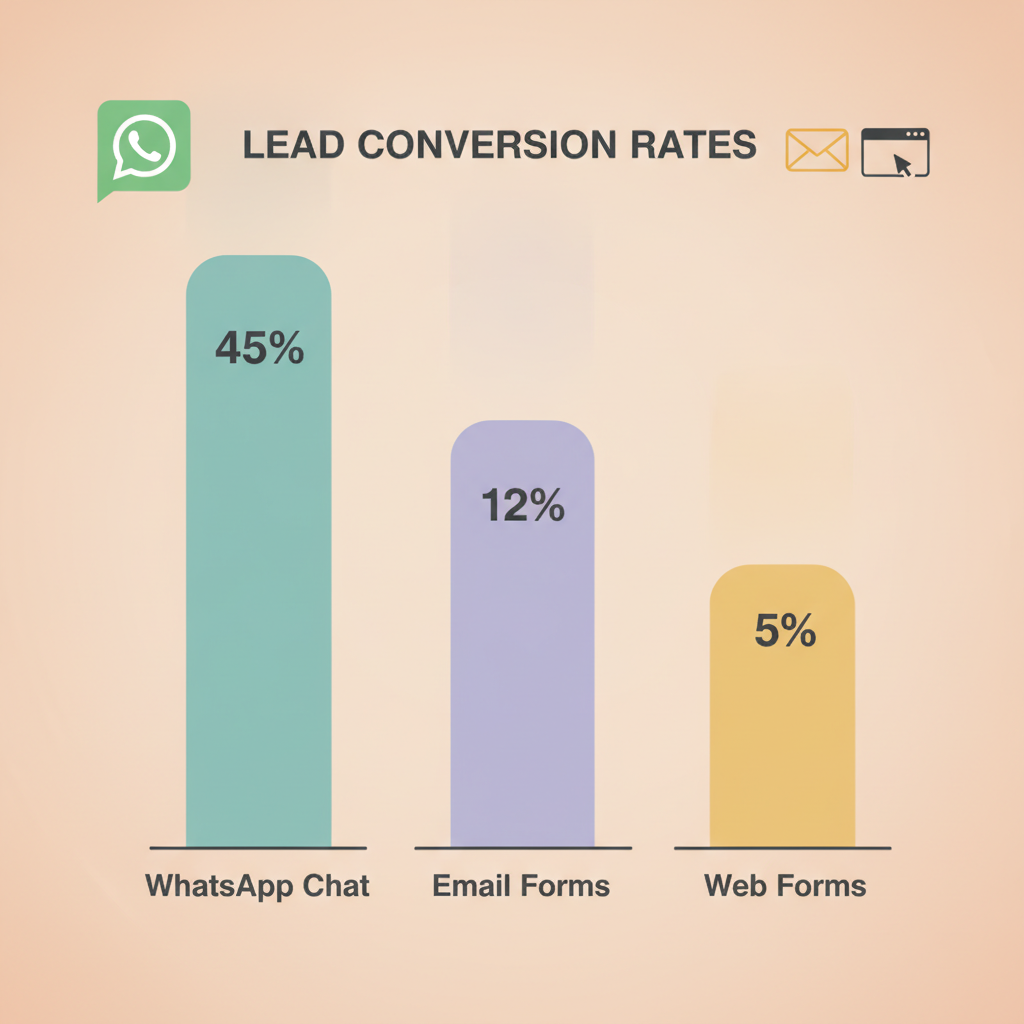 ## Setting Up the Technical Infrastructure: Webhooks and Security To build a custom WhatsApp business automation flow, you must work directly with the WhatsApp Cloud API. Unlike standard consumer apps, the Cloud API relies entirely on asynchronous event-driven communication to handle user interactions in real time. ### Configuring the Webhook Endpoint Webhooks are the only way to receive inbound messages on the WhatsApp Cloud API [8]. To process real-time user interactions, you must configure a secure HTTPS endpoint with a valid SSL certificate [8]. When a lead sends a message to your business phone number, Meta's servers deliver a JSON payload of up to 3 MB to your designated callback URL [8]. Your backend application or CRM must be prepared to parse this payload, extract the sender's phone number and message content, and trigger the appropriate automated reply. ### Securing Your Integration Because your webhook endpoint is publicly accessible on the internet, you must implement strict verification measures to prevent unauthorized or malicious requests. To secure webhook integrations, Meta includes an X-Hub-Signature-256 header in its payload [8]. This header contains a SHA256 HMAC of the raw request body, generated using your unique App Secret [8]. Your backend code must validate this signature by computing its own SHA256 HMAC of the incoming raw request body and comparing it to the value provided in the header. If the signatures do not match, the request must be rejected immediately, ensuring that incoming lead data and message events genuinely originate from Meta's servers and have not been tampered with in transit. ### Ensuring Idempotency Network fluctuations and server timeouts are inevitable in production environments. If a webhook delivery fails because your server returns a non-200 HTTP status code, Meta's system will retry the delivery with decreasing frequency for up to 7 days [8]. To prevent your automated flow from sending duplicate messages or creating duplicate leads in your CRM, developers must design idempotent webhook handlers [8]. This means tracking unique message IDs in your database and ignoring retry payloads that have already been successfully processed. ## Designing Your Automated Lead-Capture Flow An effective WhatsApp business automation flow guides a prospect from initial curiosity to qualified lead without requiring manual intervention from your team. Here is how to structure that journey. Traffic Generation: To feed your automated flow, you need a reliable source of inbound traffic. Meta's click-to-WhatsApp ads (CTWA) are highly effective for this purpose. They deliver a 30% to 50% lower cost per acquisition than standard click-to-website campaigns, with a post-click conversation rate of 35% to 55% [7]. When a user clicks your ad, it opens a pre-filled WhatsApp chat window on their device, allowing them to start a conversation instantly. Interactive Qualification: Once the conversation begins, avoid sending long blocks of text. Instead, use quick-reply buttons to ask qualifying questions. For example, ask about their budget, timeline, or specific service needs. Since interactive buttons convert 2.3 times better than plain text links, this significantly increases the completion rate of your qualification flow [3]. * CRM Synchronization: As soon as the chatbot collects the necessary details, package the data and send it to your CRM or custom web application via your webhook handler. This ensures your sales representatives have complete context the moment they step in to close the deal.
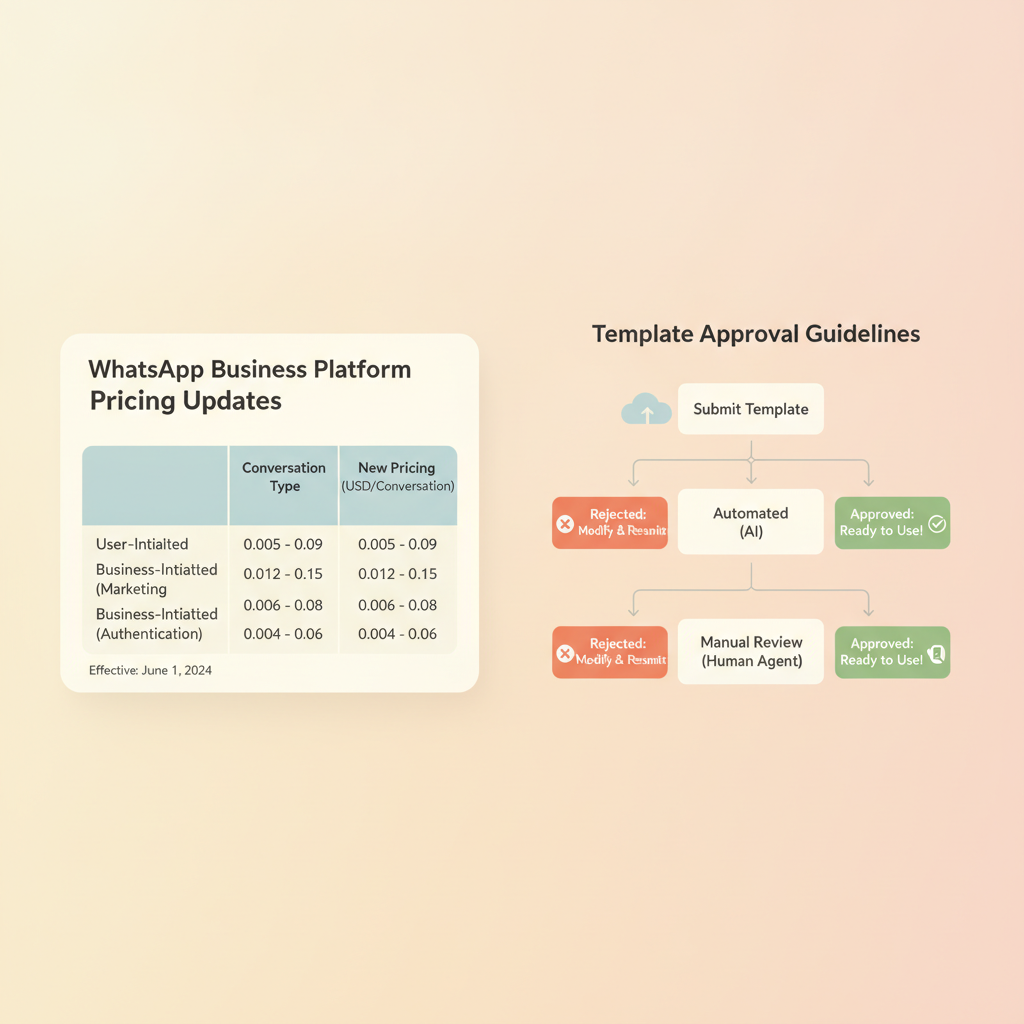
  ## Navigating Meta's Pricing Models and Policy Shifts To keep your automation workflows cost-effective, you must align your conversational design with Meta's official pricing structure and template guidelines. ### The Transition to Per-Message Pricing Meta transitioned the WhatsApp Business Platform to a Per-Message Pricing (PMP) model on July 1, 2025 [1]. This model charges businesses on a per-delivered-template basis rather than the previous per-conversation model [1]. This pricing shift fundamentally changes how developers and businesses budget for automated lead workflows, as every delivered template message is now billed individually based on its category (Utility, Marketing, or Authentication) and the recipient's country [1]. ### Template Approvals and Rejections WhatsApp template messages sent outside the standard 24-hour customer service window must be pre-approved by Meta [12]. This approval process typically takes 1 to 24 hours and carries a rejection rate of approximately 20% [12]. ### Upcoming Cost Changes In addition to the PMP model, businesses must prepare for upcoming policy updates. Effective October 1, 2026, Meta will begin charging for free-form Service messages and in-window Utility messages, which were previously free during the 24-hour customer service window [1]. This upcoming policy shift means businesses must optimize their automated conversational flows to minimize unnecessary back-and-forth messages and control overall operational costs.
  ## WhatsApp Automation vs. Traditional Lead Channels Understanding how WhatsApp compares to traditional marketing channels helps justify the development effort required for setup. | Feature | WhatsApp Automation | Traditional Email | Traditional Web Forms |
| --- | --- | --- | --- |
|---|---|---|---|
| Average Open Rate | 90% to 98% [12] | ~20% to 25% | N/A |
| Average Qualification Time | 9 minutes [3] | 6.4 hours [3] | Hours to Days |
| Conversion Rate | 28% average [3] | Low single digits | Low single digits |
| Primary Cost Structure | Per-Message Pricing (PMP) [1] | Flat subscription / volume | Hosted software |
- [3] getkanal.com — https://vertexaisearch.cloud.google.com/grounding-api-redirect/AUZIYQGK8EP8SapC9AJUPSwkvLedoPJGGd7o8sNe2RMzHMUpCB-7UbFu7FxCizY2F4cSZEFltUIDnjUCWIr56JrqGIstv-k5WbQO3CT8NpDfiDxqK41fDnaKAdGMw4mvLmOOX8smtgGnh6-od7XqiYHxOQfqbIM=
- [7] facebook.com — https://vertexaisearch.cloud.google.com/grounding-api-redirect/AUZIYQH91Zb6wEXarwjoFyP3WqrwDZNNbtxTm1MU6hTFbHNmzdkx4HKHWVie-EDmkON2M7x0WgwG2JMqEPPyW0odxFxOSqwDQTvMf4J18CNpXSawNnGjlZOEmkCLAQKsbQWExbKSJmkOvweNeCI-LAYfrMUwJcf-IyqvjQ3NaiVaLfKRUpT7nyLFOjdn2zBJFm2i4m8N
- [8] webhookrelay.com — https://vertexaisearch.cloud.google.com/grounding-api-redirect/AUZIYQEogHSnoCsszGQ2Cpg_BFd-sTMpmPPFr5zP5kqk-0ujDuUaW-SrDxF6n5z79gZRn5Un27phDrkm-L-vEP5kDv9Nhejpa86BTF0-WI_YCZOYDWSJ-IVb5rZuoxY7XdZLG6Et2ypOZdH--LKlAMd-i3Bz
- [12] wati.io — https://vertexaisearch.cloud.google.com/grounding-api-redirect/AUZIYQGUWpPdY6fj7RaSBt5hyZ3VgAZtvf9Uc2l5IjwPhXoa9tuYIA5lNKKADNfJWIV_YzLH_DtiCcKcF2qKEmQZNHP6F97lJZuHPVPs4N4RLuxBKWMwoH13mQkqwJOnGgIh9zrN_n2s-ooLQQsLlII44Sc= Building a custom WhatsApp business automation system requires a deep understanding of API integrations, secure webhook development, and Meta's evolving pricing guidelines. By structuring interactive flows, validating webhook signatures, and designing idempotent databases, businesses can establish a resilient lead generation engine that operates around the clock. Partnering with an experienced development agency can help you navigate these technical complexities and launch your automation flow efficiently.
D
David Friedman — Founder & Lead Engineer, AppBrewers · LinkedIn
David Friedman founded AppBrewers to turn agentic AI into shipped software. He builds the infrastructure that automates app creation and deployment, so products go from idea to production in weeks, not months. He is also the builder of Conversify, an AI communication platform for service businesses. Based in Malta, serving clients across Europe, the US, and the UK.